 Lauri Ojansivu
165dfa3c16
A new page in the user menu, Workload and capacity (/workload), shows week
by week how much work each person has against the hours they have, across
every board the viewer is an active member of
(docs/Features/Workload/Workload.md):

- Load: a card's new Estimated hours, set in the Time popup beside the time
  spent, less that time; story points from the board's Scrum estimate. A
  card's work is spread from its start to its due date over the days the
  person works; overdue work counts today; undated and unestimated cards are
  counted apart, and work nobody carries is shown once as unassigned.
- Capacity: each person's hours per week (default 37.5), work time percent
  (part-time 60 % is 22.5 h) and working days. Absences (vacation, sick
  leave, day off, training, other) and public holidays set by an
  administrator take their days away, and the work moves to the days the
  person is there.
- A week over 100 % - more work than hours, allocations over 100 %, or work
  in a week with no hours - is red; under half full is grey-blue. Clicking a
  week lists its cards.
- Allocations: a board's admins give a member a share of their time on the
  board for a period ("A on board X 50 % in April"), or name a role with no
  person yet ("Developer x 1, 100 %, next month"), drawn as a placeholder
  row with the hours it needs.

The server computes the report (models/lib/workload.js, server/workload.js);
cards are not published for it. Public boards and boards where the viewer
sees only their assigned cards are not included, inactive members are not
reported, and somebody else's absence is dates only: its type and note are
shown to that person and to administrators. Capacity and absences are a
person's own to change (an administrator's for anyone), allocations a board
admin's, holidays an administrator's. The four collections take no client
writes and have no publication; a deleted user's workload data goes with
them. Admin Panel / Features / Workload turns the page and its methods off.

The board's own Workload chart, a count of open cards per person, links to
the page. estimatedHours is copied by WeKan export/import.

tests/workload.test.cjs runs the rules as arithmetic, including the cases of
the request (37.5 h, 60 %, an overloaded week, a vacation, a holiday, 50 %
of April, the placeholder roles); tests/workloadAccess.test.cjs runs the real
methods as each kind of user; tests/playwright/specs/workload-capacity.e2e.js
drives the page. The new strings are translated into every language; low
confidence for the smallest ones (e.g. Tigre, Klingon, Wolaytta, Venda,
Vepsian, Cherokee, Dzongkha, Inuktitut, Nahuatl). In several locales the
eleven still-English enrollment/registration/auth strings were translated
too. The hour symbol h is language-independent in fill-translations.mjs.

Thanks to xet7 !
WeKan ® - Open Source kanban
Downloads
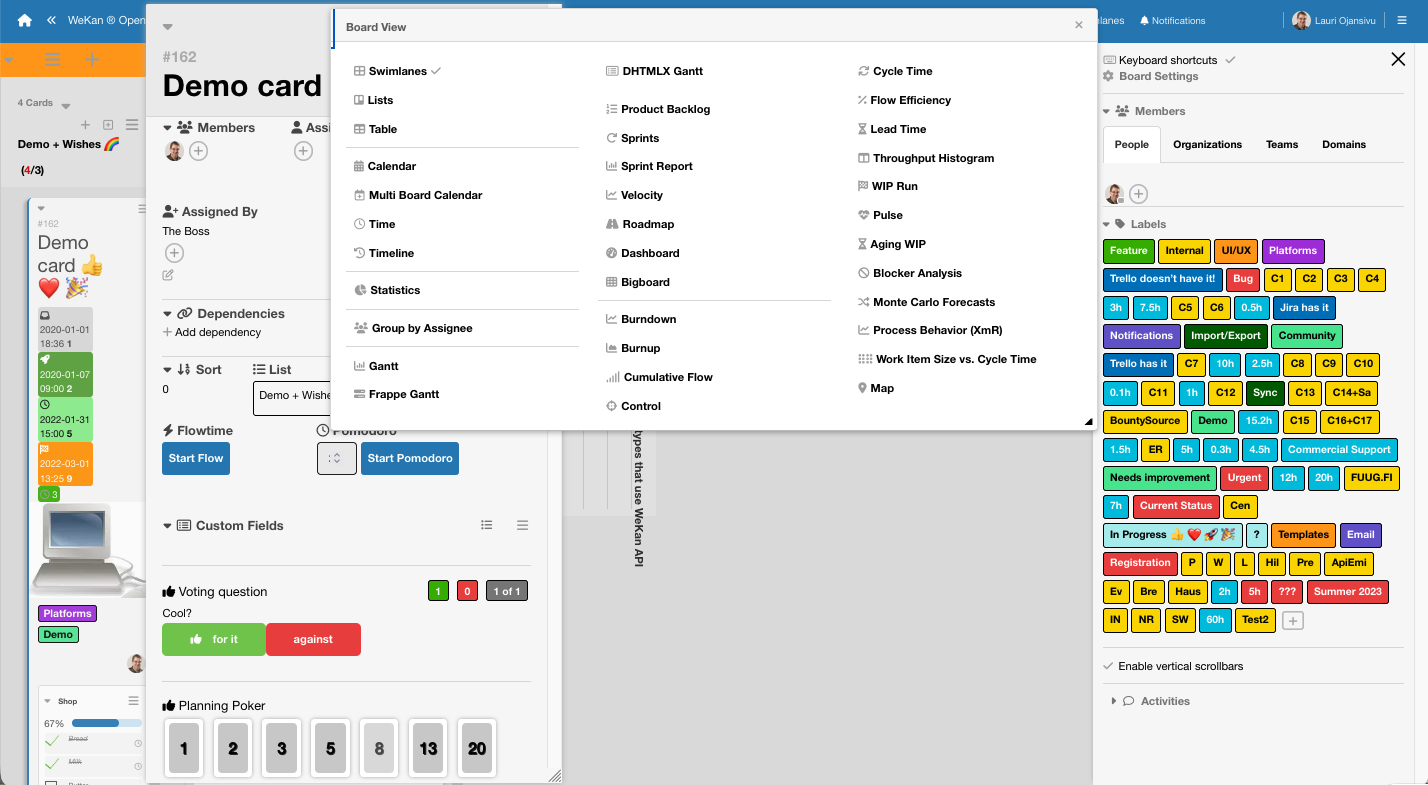
Screenshot
About WeKan ®
WeKan ® is a FLOSS collaborative kanban board application with MIT license.
Whether you’re maintaining a personal todo list, planning your holidays with some friends, or working in a team on your next revolutionary idea, Kanban boards are an unbeatable tool to keep your things organized. They give you a visual overview of the current state of your project, and make you productive by allowing you to focus on the few items that matter the most.
Since WeKan ® is a free software, you don’t have to trust us with your data and can install Wekan on your own computer or server. In fact we encourage you to do that by providing one-click installation on various platforms.
- WeKan ® is used in most countries of the world.
- WeKan ® largest user has 30k users using WeKan ® in their company.
- WeKan ® has been translated into 234 locale catalogs; 234 have non-English text for over 90% of source keys. This measures text coverage, not translation quality; language review and remaining translations are ongoing.
- Databases:
- FerretDB v1 with SQLite, the default on every platform - bundle, Docker, Snap and Kubernetes - so no database server is needed.
- FerretDB v1 with PostgreSQL works; with MySQL, MariaDB or SAP HANA it is experimental.
- MongoDB 6, 7, 8 and 9. MongoDB refuses to start on Linux kernels 6.19 to 7.0.13, which FerretDB is not affected by.
- All of them - SAP HANA only when asked - answer the same 110-query conformance catalogue the same way, checked by EVERYTHING in build.sh and build.bat.
- Features:
- Real-time user interface
- All Boards page, Drag drop reorder with one or Multi-Selection:
- Board icons at Remaining, (Sub)Workspaces, Archive
- Shared Templates: Boards, Lists, Cards
- Add Board / Import (all import and export formats):
the tools are under the same headings as on the import page, a company's or a platform's products under its name
- WeKan JSON and .zip
- 37signals: Fizzy, Basecamp
- Atlassian: Trello (JSON, and a .zip of many boards with their files), Jira
- Google: Takeout (Tasks, Keep, Mail, Calendar, Chat), Tasks, Keep
- Microsoft: Excel, GitHub, Planner, Azure DevOps Boards, Lists, Project (XML), Outlook (.msg), To Do, OneNote, Teams
- Sandstorm grain backups: WeKan, Prioritize, Yet Another TODO list, μTodo, SandChat, EtherCalc, Radicale calendar and address book, Davros, Hacker CMS, Gogs, WordPress
- Kanban and project tools: Kanboard, Nextcloud Deck, OpenProject, Asana, Zenkit, Focalboard, MeisterTask, Obsidian Kanban, ClickUp, Nullboard, Kanri, monday.com, Taiga, Wrike, Teamwork.com, Businessmap, Quire, Notion, Plane
- Issue trackers and version control: GitLab, Gitea, Forgejo, Linear, Pivotal Tracker, Redmine
- Task and to-do apps: todo.txt, Taskwarrior, Todoist, TickTick, Tasks.org, Super Productivity, Vikunja
- Spreadsheets and tables: CSV / TSV
- Text and outlines: Markdown, Leo, OPML, Org mode
- Mail, calendars, chats and notes, each into the view it fits: Mail (mbox, .eml), iCalendar, Slack, Mattermost, Telegram, WhatsApp, Discord, Rocket.Chat, Evernote
- Fetched from the service's API with your credentials: Planka, KanbanFlow, Basecamp, Microsoft To Do, OneNote and Teams, Google Tasks and Keep
- Large files are streamed to disk, within its free space or the Admin Panel limit
- Import many boards at once: several export files, or a .zip of them, each its own board; One board per project splits an export of a whole app into a board per project
- Change Color: Board theme and background image, Swimlane, List, Card
- Overrides: 1 Admin Panel, 2 Board Settings, 3 Member Settings
- Drag drop reorder with one or Multi-Selection:
- Board icons to Workspaces at All Boards page
- Swimlane, List, Minicard
- Board
- Top header: Mobile/Desktop view, Show/Hide Drag Handles, Starred Boards Bookmarks, Sort Boards, Filter, Search, Notifications, Member Settings
- Member Settings:
- Show My Dependencies, Show Board Dependencies, Import/Export JSON/SVG
- Dependencies are for SAFe PI Plannings, drawing colored lines between cards, like Kendis or Scaled Agile Framework. Import Export as JSON and SVG.
- My Cards, Due Cards, My Attachments, Search All Boards, Date Settings, Change color - override theme, Notifications Settings (Tray, Email, etc), Font change and Font size change, Change Avatar, Change Language (234 locale catalogs)
- Change Settings: Show desktop drag handles, Submit editors with Enter, Open many cards at once, Play a sound when a checklist item is completed, Show cards count if list contains more than ... cards, Show rescue dialogue before closing for unsaved card descriptions
- Show My Dependencies, Show Board Dependencies, Import/Export JSON/SVG
- Board Views:
- Swimlanes, Lists
- Minicard: At list there is card, that has not been not opened yet
- Card: Opened card popup of minicard
- Attachments viewer for PDF and Office documents
- Kanban and Scrum flow fields: Blocked, Class of service, MoSCoW priority, WSJF score
- List policies, Definition of Ready, commitment point, WIP limit per person, lists split into Doing and Done
- Drag drop reorder one or Multi-Selection: Swimlanes, Lists, Minicards, Checklists, Checklist Items
- Collapse/Uncollapse: Menus, Swimlanes, Lists, Cards
- The Board View menu, under its headings; each view shown, hidden and ordered per board:
- Board: Swimlanes, Lists, Table, Group by Assignee, Bigboard, Map, Column sets
- Calendar and time: Calendar, Calendar Mode, Multi Board Calendar, Time, Timeline, Gantt, Frappe Gantt, DHTMLX Gantt, Roadmap
- Scrum: Product Backlog, Sprints, Sprint Report, Velocity, Burndown, Burnup, Release Burndown, Epic Progress
- Kanban flow: Cumulative Flow, Control, Cycle Time, Flow Efficiency, Lead Time, Throughput Histogram, WIP Run, Aging WIP, Blocker Analysis, Monte Carlo Forecasts, Process Behavior (XmR), Work Item Size vs. Cycle Time, Created vs. Resolved, Net Flow, Time in List, Average Age, Throughput Run Chart, Due Date Performance
- Overview: Statistics, Dashboard, Pulse, Workload, Distribution, Dependency Map, Activity Heatmap
- Communication and code: Email, Chat, Version Control
- The charts and reports each have PDF and Excel export
- Right Sidebar / Board Settings:
- Rules: like IFTTT like Trello Butler
- Lists view for Rules
- Workflow view: like Jira Workflows
- Blocks: like Scratch or Jira AutoBlocks, shows same IFTTT Rules
- Import / Export IFTTT Rules; import n8n, Node-RED and Trello Butler; import / export Wrike workflows
- Export board :
- Select what to include: Card details, Board, Activities, Labels, People (Creator, Owner, Members, Assignees), Board Info (Board, List, Swimlane), Dates (Created, Received, Start, Due, End), Description, Custom Fields, Checklists, Subtasks, Comments, Attachments, Voting, Planning Poker, Stickers, Location (link to map based on coordinates), Dependencies, Sort, Scrum Settings
- Export to (all formats): under the same headings as Import - WeKan: JSON with or without attachments, .zip with attachments; PDF, Excel, HTML, Calendar feed (iCal), Dependencies JSON/SVG, CSV , ; TSV - 37signals: Fizzy - Atlassian: Trello (JSON, .zip with attachments, or straight into Trello through its API), Jira - Microsoft: Planner, Azure DevOps Boards, Lists, Project (XML), Outlook (.eml), Teams, OneNote, GitHub - Sandstorm grain backups that Sandstorm restores: Prioritize, Yet Another TODO list, μTodo, SandChat, EtherCalc, Radicale calendar and address book, Davros, Hacker CMS - Kanban and project tools: Kanboard, Focalboard, MeisterTask, Obsidian Kanban, ClickUp, Nullboard, Kanri, monday.com, Wrike (Excel and workflow), Teamwork.com, Businessmap, Quire, Notion, Nextcloud Deck, OpenProject, Asana, Zenkit, Taiga - Issue trackers and version control: Linear, Pivotal Tracker, Redmine, GitLab, Gitea, Forgejo - Task and to-do apps: todo.txt, Taskwarrior, Todoist, TickTick, Tasks.org, Super Productivity, Vikunja - Text and outlines: Markdown, Leo, OPML, Org mode - Mail, chats and notes: mbox, Evernote, Mattermost, Rocket.Chat - Every export is written a page of cards at a time, so a large board exports without running out of memory
- Export all boards at once (All Boards sidebar, or Multi-Selection): Excel as one workbook with a sheet per board, every other format as a .zip with a file per board
- Scrum Settings: Definition of Ready and Done, Daily standup timer, Retrospective board
- Change color theme, Change Background Image, Date settings
- Settings:
- Board View: Show/Hide and drag drop reorder what is shown at Public Board and Private Board
- Swimlane: Scrum settings, Lock resize swimlane height, WIP Limit Groups
- Board View: Show/Hide and drag drop reorder what is shown at Minicard and Card
- Admin Panel
- Settings
- Version
- Features: which features this WeKan offers, Card fields, Feature profiles
- Appearance: What is shown/hidden, Whitelabeling
- Announcement
- Accessibility
- Translation: Add custom translation strings
- PWA
- Global Webhooks
- Settings
- People
- Email, Notifications, Domains, Organizations, Teams, People
- Locked Users, Roles, Shared Templates
- Login, SAML, LDAP, OAuth2 login providers, Passwordless login
- Attachments
- Scheduled Backups, Continuous realtime backups, Move Attachments, Default Save Storage, Limits
- Storage: MongoDB GridFS, Filesystem, S3/MinIO, Azure Blob, Google Cloud
- Database migration
- Problems
- Summary
- Security
- Delete: Optional enable permanent delete.
- History Undo/Redo available at Board, List, Card, etc menus at Swimlanes and List views
- Notifications
- Reports
- Security: shows any attempted attacks based on names from https://wekan.fi/hall-of-fame/ like built-in SIEM with country flag and city based of location of IP address based on location headers like CloudFlare etc
- Impersonation
- Performance, Speed, Tests, CPU usage, Instrumentation, Broken Cards, Files, Rules, Boards, Recovery, Offices, API, Database problems, Filesystem integrity
- Platforms:
Docker Containers
image: ghcr.io/wekan/wekan:latest
image: wekanteam/wekan:latest
image: quay.io/wekan/wekan:latest
docker-compose.yml at https://github.com/wekan/wekan/blob/main/docker-compose.yml
Standards
- WeKan and Standard for Public Code assessment was made at 2023-11. At 2026 WeKan became full FLOSS with FerretDB v1 Fork, also see 2026 talk WeKan 10 years at https://wekan.fi/docs for more details. Currently Wekan meets 9 out of 16 criteria out of the box. Some others could be met with small changes.
Code stats
Translate WeKan ® at Transifex
Translations to non-English languages are accepted only at Transifex using webbrowser. New English strings of new features can be added as PRs to master branch file wekan/imports/i18n/data/en.i18n.json .
WeKan ® feature requests and bugs
Please add most of your questions as GitHub issue: WeKan ® Feature Requests and Bugs. It's better than at chat where details get lost when chat scrolls up.
Discussions
FAQ
NOTE:
- Please read the FAQ first
- Please don't feed the trolls and spammers that are mentioned in the FAQ :)
Requirements
- 1 GB RAM minimum free for WeKan ®. Production server should have minimum total 4 GB RAM. For thousands of users, for example with Docker: 3 frontend servers, each having 2 CPU and 2 wekan-app containers. One backend wekan-db server with many CPUs.
- Enough disk space and alerts about low disk space. If you run out of disk space, MongoDB database gets corrupted.
- SECURITY: Updating to newest WeKan ® version very often. Please check you do not have automatic updates of Sandstorm or Snap turned off. Old versions have security issues because of old versions Node.js etc. Only newest WeKan ® is supported. WeKan ® on Sandstorm is not usually affected by any Standalone WeKan ® (Snap/Docker/Source) security issues.
- Reporting all new bugs immediately. New features and fixes are added to WeKan ® many times a day.
- Backups of WeKan ® database once a day minimum. Bugs, updates, users deleting list or card, harddrive full, harddrive crash etc can eat your data. There is no undo yet. Some bugs can cause WeKan ® board to not load at all, requiring manual fixing of database content.
Roadmap and Demo
Roadmap - Public read-only board at WeKan ® demo.
- There are many companies and individuals contributing code to WeKan ®, to add features and bugfixes many times a day.
- Please add Add new Feature Requests and Bug Reports immediately.
- Commercial Support.
We also welcome sponsors for features and bugfixes. By working directly with WeKan ® you get the benefit of active maintenance and new features added by growing WeKan ® developer community.
Getting Started with Development
The main branch uses Meteor 3.x with Node.js 26.x. See CHANGELOG.md for the latest runtime updates.
To contribute, create a fork and run ./build.sh (or ./build.bat on Windows) as detailed here. Once you're ready, please test your code and submit a pull request (PR).
Please refer to the developer documentation for more information.
First-Time Setup for Development
Prerequisites
Before building WeKan from source, ensure you have:
- Git - for cloning the repository
- Node.js 26.x - WeKan requires Node.js 26.x
- Meteor - the JavaScript framework WeKan is built with
Building WeKan
The build.sh script shows a two-level menu. The top level groups options into categories:
1) Setup 2) Dev server 3) Tests 4) Docker 5) Tools 6) Quit
You pick a category number, then the item number inside it (each submenu also has a Back entry). Building from source is a three-stage process:
- Setup -> Install dependencies - Downloads all required Meteor packages and npm modules
- Setup -> Build WeKan - Compiles the application
- Dev server -> localhost:3000 - Starts the development server at http://localhost:3000
# Clone your fork
git clone git@github.com:YOUR_USERNAME/wekan.git
cd wekan

# Make the script executable
chmod +x build.sh

# Step 1: Install dependencies (Setup -> Install dependencies)
./build.sh
# Press 1 (Setup) and Enter, then 1 (Install dependencies) and Enter

# Step 2: Build WeKan (Setup -> Build WeKan, after dependencies complete)
./build.sh
# Press 1 (Setup) and Enter, then 2 (Build WeKan) and Enter

# Step 3: Run WeKan in development mode (Dev server -> localhost:3000)
./build.sh
# Press 2 (Dev server) and Enter, then 1 (localhost:3000) and Enter
If a dev server is already running on that port, the Dev server options stop it automatically and start a fresh server on the same port.
WSL Users
WSL users can use Snap. See install docs.
License
WeKan ® is released under the very permissive MIT license, and made with Meteor.