
Shop Search AddOn for QuickShop
Version: 2.0.8.2-RELEASE
An unofficial add-on for QuickShop-Hikari that gives your players an in-game /finditem command to search every shop on the server at once, instead of walking around hoping to spot the right sign.



What it does
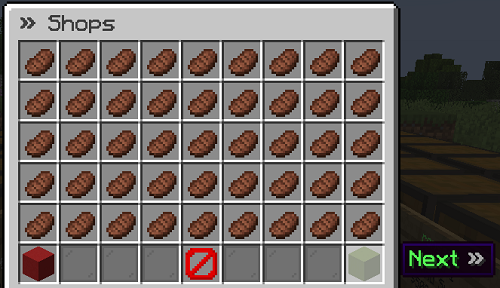
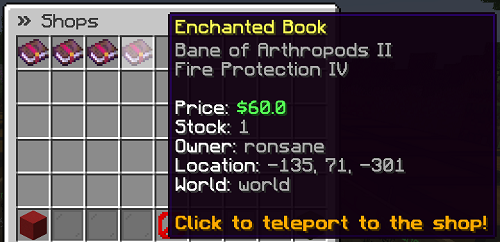
Players type /finditem, and a menu opens where they can search for an item by name or type. The plugin scans every shop on the server, both buying and selling, and shows the results in a paginated GUI with prices, stock, owner, location, and (optionally) a warp or teleport button to get there. No more asking in chat "does anyone sell diamonds."
Getting started
- Make sure QuickShop-Hikari and Vault (with an economy plugin) are installed.
- Drop the plugin jar into your server's
pluginsfolder. - Restart the server. A
config.ymlwill be generated automatically. - In game, run
/finditemto try it out.
That's it, no extra setup is required to get the basic search working. Everything else below is optional tuning.
Using /finditem
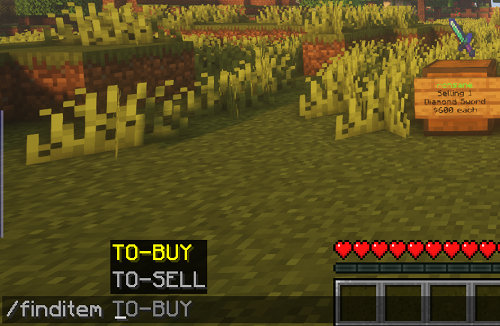
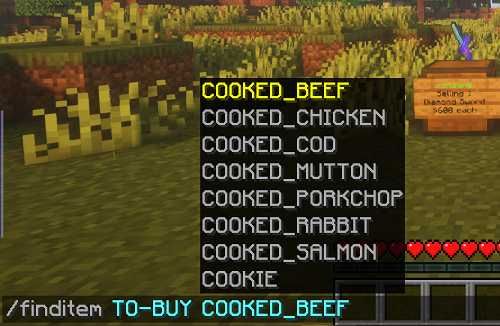
/finditem TO_SELL <item>: find shops that are selling this item, so you know where to buy it/finditem TO_BUY <item>: find shops that are buying this item, so you know where to sell it/finditem TO_SELL *or/finditem TO_BUY *: browse every shop on the server/finditem hideshop: while looking at a shop chest, hides that shop from search results/finditem revealshop: makes a previously hidden shop searchable again/finditemon its own shows the full command list in game
The TO_SELL / TO_BUY labels describe what the shop does, same as QuickShop itself. If that wording feels backwards for your players, you can rename these in config.yml under find-item-command.to-buy-autocomplete and to-sell-autocomplete.
Players can also search by typing a partial item name (tab completion helps here), and custom items with custom model data are matched correctly, not just lumped in with the base item.
By default the command also works as /searchshop, /shopsearch, and /searchitem. You can change or remove these aliases in config.yml under find-item-command.command-alias.
Demo
Searching for an item:
Multiple result pages:
Enchantments shown in the listing:
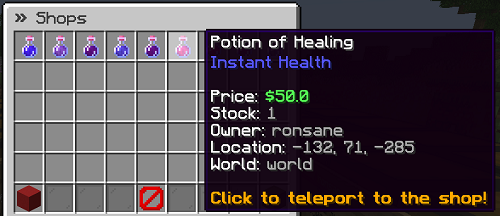
Potion colors and effects shown in the listing:
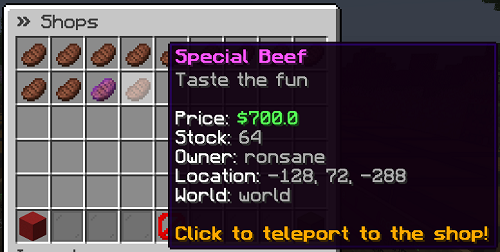
Custom item names and lore preserved:
Admin commands
/finditemadmin (alias /fiadmin) is for server staff:
/finditemadmin reload: reloadsconfig.ymlwithout restarting the server/finditemadmin debug-mode {enable|disable}: turns on extra logging if you're troubleshooting an issue and want more detail in the console
Features
Search
- Search by item type or by a free-text query, with tab completion
- Matches custom items by their custom model data instead of just the base material
- Enchantments and potion effects (including custom colors) are shown right in the results
- Enchant glow is hidden automatically if the item has the "hide enchants" flag
- Out-of-stock shops are skipped by default so players don't waste a trip
- Optionally limit results to a distance from the player (
shop-search-max-distanceinconfig.yml), handy on large servers where a shop three continents away isn't useful - Optionally restrict searches to already-loaded chunks for lower server load
Shop privacy
- Shop owners can hide their own shop from search results with
/finditem hideshop, and unhide it with/finditem revealshop
Getting to the shop
- Safe direct teleportation to a shop, with an optional delay and a check that the landing spot isn't going to hurt the player (both are configurable, and both can be bypassed with permissions if you want staff to skip them)
- Or teleport players to the nearest warp instead, using PlayerWarps or EssentialsX warps
- Run your own custom commands when a player clicks a search result, useful if you use a different teleport or warp plugin
Customization
- Every message in
config.ymlsupports hex color codes - Command aliases, GUI titles, button materials, and lore text are all editable in
config.yml - Large prices can be shortened automatically (for example,
$10,210,100shown as$10.21M) - Optional shop visit counter you can show in the GUI lore with the
{SHOP_VISITS}placeholder
Server control
- Block specific worlds from appearing in search results
- Block specific materials from being searchable at all (useful for blocking things like command blocks or barriers that shouldn't be shop items in the first place)
- Works on both Paper and Folia servers
Permissions
| Permission | Default | What it allows |
|---|---|---|
finditem.use |
everyone | Use /finditem to search |
finditem.hideshop |
everyone | Use /finditem hideshop and /finditem revealshop |
finditem.shoptp |
op | Teleport directly to a shop (only matters if direct teleport is enabled in config) |
finditem.shoptp.own |
everyone | Teleport to your own shops |
finditem.shoptp-delay.bypass |
op | Skip the configured teleport delay |
finditem.shoptp.bypass-safetycheck |
nobody | Skip the "is it safe to land here" check |
finditem.reload |
op | Use /finditemadmin reload |
finditem.admin |
op | Use all admin commands |
Integrations
The plugin picks these up automatically if they're installed, no extra configuration needed beyond what's in config.yml:
- PlayerWarps: shows the nearest warp to each shop in the search results
- EssentialsX Warps: same idea, using Essentials warps instead. The warp list refreshes every 15 minutes in the background to keep searches fast. If you just added a warp and don't want to wait, run
/finditemadmin reload - WorldGuard: can show which region a shop is in (if regions overlap, the highest priority one is used)
- Residence: can show which residence (including subzones) a shop is in
- BentoBox: shops on locked islands are excluded from search results
None of these are required. The plugin works fine with just QuickShop-Hikari and Vault installed.
Configuration
All settings live in config.yml, which is generated the first time the plugin starts. A fully annotated sample, with every option explained, is available on the wiki.
When you update the plugin, any new config options are added automatically to your existing config.yml the next time the server starts, so you won't lose your existing settings.
Requirements
- QuickShop-Hikari v6.3.0.0 or higher
- Vault with a compatible economy plugin
- Paper 1.20 or higher (Folia is supported too)
Note: support for the older QuickShop Reremake fork has been dropped completely. If you're still on Reremake, this plugin won't work for you.
Getting help / reporting a bug
If something's not working, please open an issue and include as much detail as you can, ideally with your console log attached. That same page also lists what's currently being worked on.
Contributing
Pull requests are welcome. See CONTRIBUTING.md for how to set up a build and the branch naming convention we use.
Metrics
We use bStats to see how many servers are running the plugin and on what versions, which helps prioritize what to support. No personal data is collected.
